
How to Remove the "AI-Generated" Label on TikTok (We Tested It)
TikTok labels posts "Contains AI-generated media" by reading data inside the file. We posted an AI image and an AI video from the app, original and cleaned: the originals were labelled, the cleaned copies were not.

Short answer: TikTok adds "Contains AI-generated media" automatically when the file you upload carries Content Credentials, a block of data that AI tools like Gemini, ChatGPT and Google's Veo write into what they make. Once the label is on a post, there's no option to remove it. If the label shouldn't be there, the fix is to remove that data before you post: in our test, the same image and the same video posted again without it got no label.
We tested this ourselves on November 4, 2026, with one AI image and one AI video, posted from the TikTok app. Below is what we did, what TikTok did, and when you should keep the label anyway.
Why TikTok says "AI-generated"
TikTok has two ways a post ends up labelled:
- You turn it on yourself when you post. TikTok asks creators to do this for realistic AI content.
- TikTok adds it automatically. In May 2024 TikTok said it had started reading Content Credentials to label AI content uploaded from other apps. Content Credentials (also called C2PA) are data stored inside the file that say which AI tool made it.
Most people asking how to remove the label are dealing with the second kind. They didn't switch anything on. The file told TikTok.
Which tools write this data changes often. When we checked in October 2026, files from Gemini, ChatGPT, Grok and Google Flow carried Content Credentials. Meta AI and Midjourney wrote other AI tags instead. More in which platforms label AI images.
What we tested
We posted two pairs from the TikTok app on an iPhone. Every post was private ("Only me"), and TikTok's own AI-generated switch was off, so any label came from TikTok itself.
- An image from Gemini, exactly as downloaded, and a cleaned copy made with AI Metadata Cleaner.
- An 8-second video from Google Flow (Veo 3.1 Fast), exactly as downloaded, and a cleaned copy made with our video metadata remover. The cleaned video has the same picture and sound; only the data around them was removed.
Both originals carried Content Credentials signed by Google, and both said a SynthID watermark had been applied. SynthID is Google's invisible watermark, hidden in the picture itself. Removing metadata doesn't remove it, so the cleaned copies still had it.
The result
| File | Original | Cleaned copy |
|---|---|---|
| Gemini image | Labelled within 5 minutes | No label after 6 minutes |
| Google Flow (Veo) video | Labelled 9 seconds after posting | No label after 4 minutes |
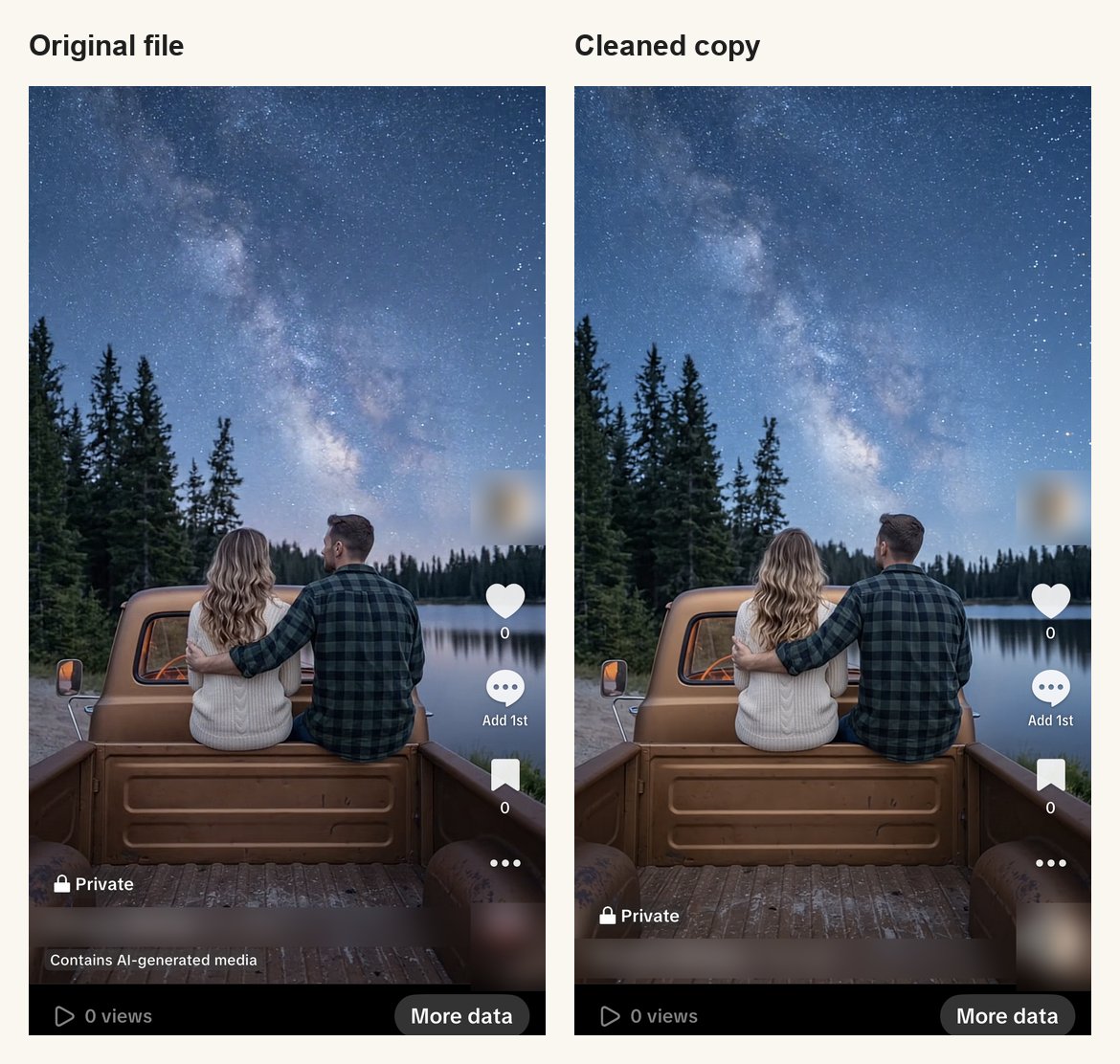
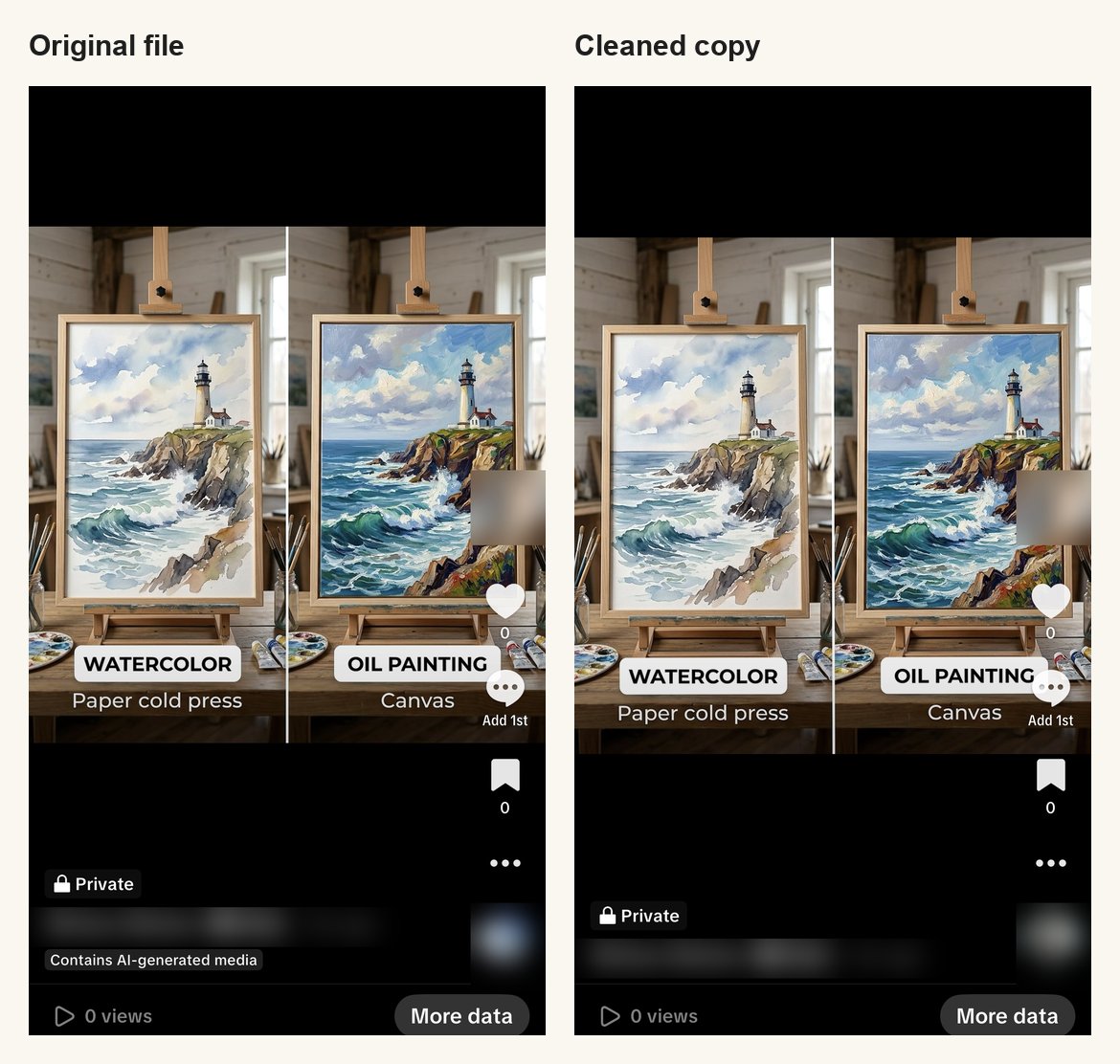
The video was labelled 9 seconds after posting, so TikTok reads the file as it's uploaded. And because the cleaned copies still had SynthID in the picture, in our test TikTok labelled from the file's data, not from the watermark.
Instagram and Facebook behaved the same way in our earlier tests.
One thing that didn't work: in October we uploaded AI images from TikTok Studio on a computer, and none was labelled, not even the untouched originals. So if you test this yourself, post from the app.
Can you remove the label after posting?
We couldn't. On a post TikTok had labelled automatically, the post's menu had no option to remove or switch off the label.
So the label has to be dealt with before you post. If a post already has a label it shouldn't have, the only way we found is to delete it and post again from a cleaned file. Deleting a post loses its views and comments, so do this early.
How to post without the automatic label
- Download your file from the AI tool as normal.
- Clean it. Images: drop them into AI Metadata Cleaner, free, in your browser. Videos: use the video metadata remover (free accounts get 3 videos a month). The picture and sound aren't re-encoded.
- Post the cleaned file from the TikTok app, not the original. It's easy to pick the wrong file from your camera roll, and the original still carries the AI data.
- Don't re-export it through another editor afterwards. Re-exporting can write new data back in.
If you edit in an app before posting, clean the final export, not the first download.
When you should keep the label
TikTok's rules are clear on this. Its Community Guidelines ask creators to label AI-generated or significantly edited content that shows realistic-looking scenes or people, and say unlabelled content may be removed, restricted, or labelled by TikTok.
So:
- A realistic AI video of a person, a place or an event: label it yourself with TikTok's AI-generated switch. Removing the file's data doesn't change what TikTok's rules ask of you.
- Obvious AI art, illustrations, stylised images, or a real photo with a small AI fix: these are where the automatic label tends to feel wrong, and where cleaning the file makes sense.
More on the rules across platforms in is it legal to remove AI metadata.
What cleaning doesn't do
- It doesn't beat detection that looks at the picture. TikTok says it also uses its own detection models. Our cleaned copies weren't labelled, but that's two posts, on one day. TikTok can change this at any time.
- It doesn't remove visible watermarks or anything that's part of the picture, like Google's SynthID.
- It doesn't help with TikTok's own AI tools. In November 2025 TikTok said it is adding invisible watermarks to content made with its tools like AI Editor Pro.
Frequently asked questions
Why does my TikTok say "Contains AI-generated media" when I didn't turn on the label?
Because the file carried AI data. AI tools like Gemini, ChatGPT and Google's Veo write Content Credentials into their files, and TikTok reads them when you upload. In our test, a Gemini image and a Veo video were both labelled with TikTok's own AI switch off.
Can I remove the AI-generated label from a TikTok post?
Not on a post TikTok labelled automatically: we found no option for it in the post's menu. You can only avoid it before posting, by removing the AI data from the file first.
Does removing metadata stop TikTok's AI label?
In our test, yes. The same Gemini image and the same Veo video, cleaned with AI Metadata Cleaner, were not labelled, while the originals were. That was two pairs on November 4, 2026; TikTok also has its own detection and could label content in other ways.
Does TikTok detect AI from the picture itself?
In our test it didn't. Our cleaned copies still had Google's SynthID watermark in the picture and got no label. TikTok says it uses its own detection models too, so this could change.
Will cleaning the video lower its quality?
No. The picture and sound are copied across unchanged, without re-encoding. Only the data stored around them is removed.
Do I have to label AI content on TikTok?
For realistic AI content, yes. TikTok's rules ask creators to label AI-generated or significantly edited content showing realistic-looking scenes or people, using the AI-generated switch when posting.
About the Author
Muntaseer Rahman
Founder of AI Metadata Cleaner. Software engineer focused on image privacy, metadata security, and helping creators protect their digital work.