
How to Remove the "AI Content" Label from a Facebook Post (We Tested It)
Facebook adds "AI content" when your image carries AI data from the tool that made it. We posted Gemini, ChatGPT and Meta AI images, original and cleaned: every original was labelled, no cleaned copy was.

Short answer: Facebook adds "AI content" to a post when the image file carries AI data inside it, written there by the tool that made it, such as Gemini, ChatGPT or Meta AI. Remove that data before you post and, in our test, the post went up with no label. Once Facebook has added the label there's no option to take it off, so clean the file first.
We tested this on Facebook in October 2026 with images from three AI tools, and checked the same posts again in November. Here's what we did and what Facebook showed.
Why Facebook labels a post "AI content"
Facebook, Instagram and Threads all use Meta's labelling. When Meta started it in February 2024, it said it would read industry-standard signals stored in the file: C2PA Content Credentials and IPTC tags. AI tools write these into what they make.
Facebook says the same on the post itself. Open the post's menu and choose About AI content, and it explains that the label is "based on a signal added by the tool used to create the content". It also says not all AI content carries that data.
So there are two ways a post gets the label:
- You turn on the AI label when you post.
- Facebook adds it itself, because the file says an AI tool made it.
What we tested
We made one image each in Gemini, ChatGPT and Meta AI, kept the files exactly as downloaded, and made a cleaned copy of each with AI Metadata Cleaner.
Then we posted all six from our own account. Every post was set to Only me, and Facebook's own AI label switch was off, so any label came from Facebook.
The result
| Image | Original | Cleaned copy |
|---|---|---|
| Gemini | "AI content" | No label |
| ChatGPT | "AI content" | No label |
| Meta AI | "AI content" | No label |
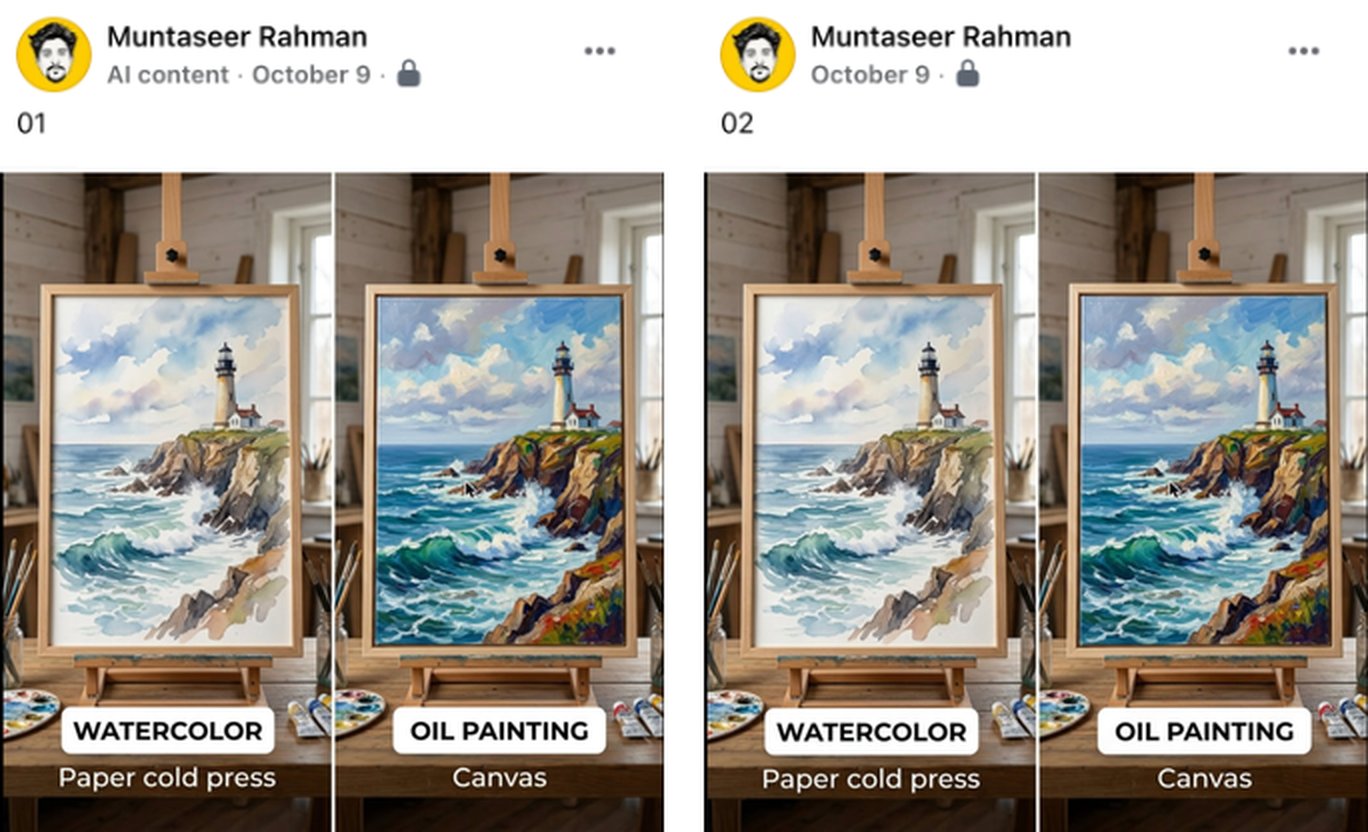
The labels appeared within seconds of posting. We checked again 20 minutes later and once more six weeks later: the originals still said "AI content" and the cleaned copies still had no label.
The Meta AI image is worth noting. It came from Meta's own tool and carried no Content Credentials at all, only an IPTC tag saying it was AI-made, and Facebook still labelled it. Removing that tag was enough to stop the label.
Instagram behaved the same way, with photos and with Reels.
How to post on Facebook without the automatic label
- Download the image from the AI tool as normal.
- Clean it with AI Metadata Cleaner. It's free and runs in your browser; the image isn't uploaded anywhere. For a video, use the video metadata remover.
- Post the cleaned file, not the original. They look the same, so name them clearly.
- Don't re-export it in an editor afterwards. Some editors write their own AI data back in.
Can you remove the AI label from a Facebook post after posting?
Not if Facebook added it. On our labelled post, the post's menu had no option to remove or switch off the label, only About AI content, which explains it. If you turned the label on yourself, you can edit the post and switch it off.
For a label Facebook added, the only fix is to delete the post and post a cleaned copy. That loses the post's reactions and comments, so do it early.
When you should keep the label
Meta requires people to label photorealistic video and realistic-sounding audio made or changed with AI, and can add a more prominent label to anything that could seriously mislead people. Removing metadata doesn't change that.
- A realistic AI image of a real person or a news event: keep the label, or add it yourself.
- Obvious AI art, a design, or a real photo with a small AI fix: this is where the automatic label tends to feel wrong, and where cleaning the file makes sense.
More on the rules in is it legal to remove AI metadata.
What cleaning doesn't do
- It doesn't remove watermarks inside the picture, like Google's SynthID, or visible watermarks.
- It doesn't promise the future. This was three pairs of posts. Meta can start reading watermarks or using its own detection at any time.
- It doesn't help if you edit afterwards in an app that writes AI data into its export.
Frequently asked questions
Why does my Facebook post say "AI content" when I didn't add a label?
Because the image file carried AI data written by the tool that made it. Facebook reads it when you upload. Clean the file and post it again.
Is it the same label as Instagram's "AI info"?
It's the same Meta system, reading the same data in the file. In our tests Facebook showed "AI content" next to the date; Instagram shows "AI info" or "AI content".
Does Facebook detect AI from the picture itself?
Not in our test: the cleaned Gemini copy still had Google's invisible watermark and wasn't labelled. Facebook's own note says not all AI content contains the data it needs, which fits.
Does this work for Facebook Reels and videos too?
We tested video Reels on Instagram, which uses the same Meta labelling, and the cleaned Reel wasn't labelled. We haven't run a separate Facebook video test.
Will cleaning lower the image quality?
AI Metadata Cleaner saves a fresh high-quality copy by default. Turn on Preserve original quality to remove the metadata only and leave the image data untouched.
About the Author
Muntaseer Rahman
Founder of AI Metadata Cleaner. Software engineer focused on image privacy, metadata security, and helping creators protect their digital work.